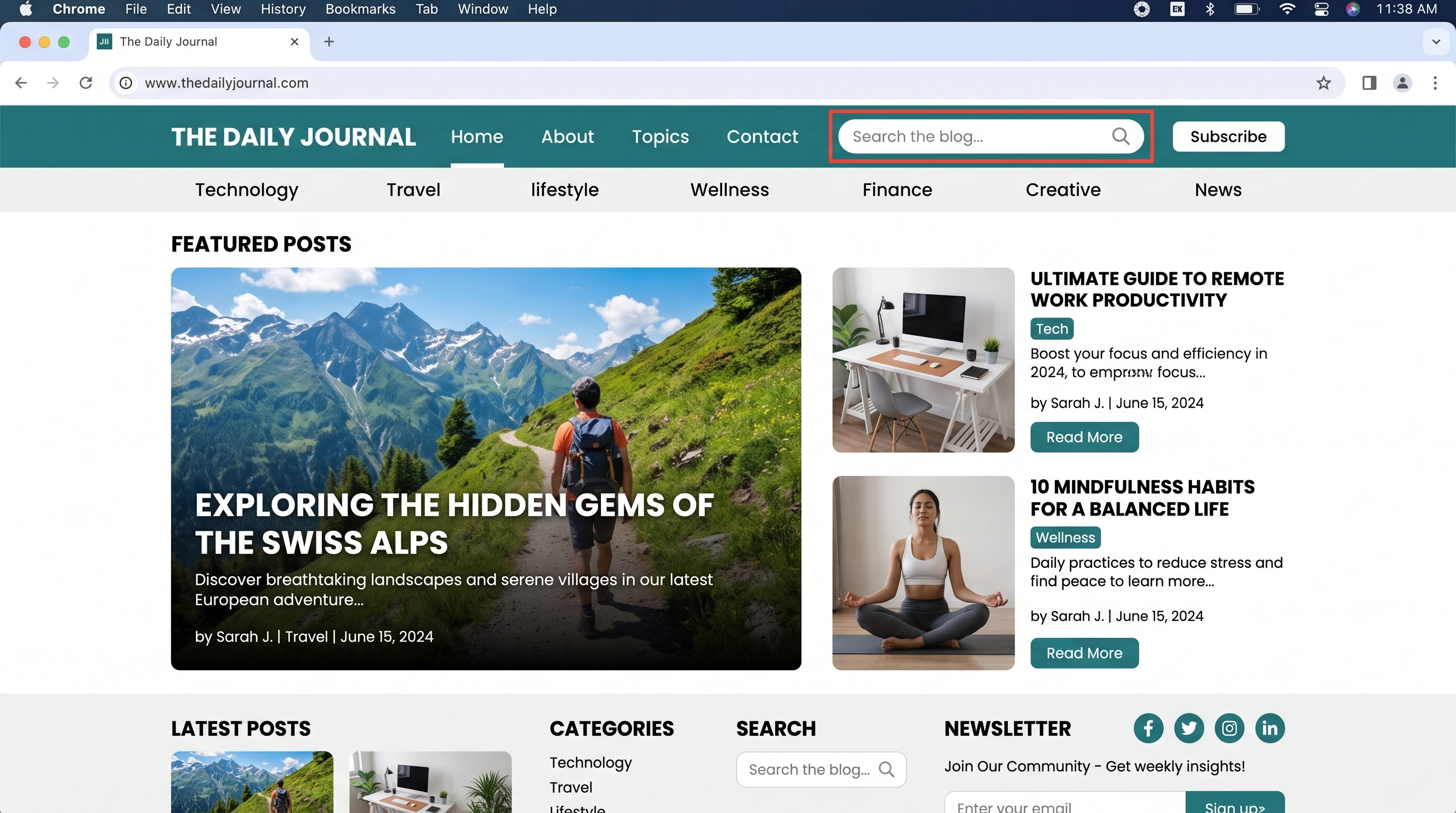
 Whether you’re brand new here or simply looking to get more out of this blog, finding your way around and making the most of everything on offer isn’t always obvious. I built this site not just to share tips, stories, and how-tos, but to help readers connect, stay informed, and walk away with real solutions for everyday problems. That said, it pays off to know how to use this blog to its fullest potential. Taking advantage of all the tools on this blog means your time here is more enjoyable and helpful, turning small visits into meaningful experiences.
If you’ve ever found yourself wondering what’s the best way to search for topics, interact in the comments, or stay on top of the latest updates, this guide is for you. I’ll walk through all the features I’ve set up, from basic navigation to saving your favorite posts, so you can get straight to the good stuff. Along the way, you’ll pick up tips for building connection with other readers and making sure you never miss out on useful content.
1. Navigating the Blog Efficiently
The homepage works as the main hub. You’ll spot featured posts up top, a menu to browse by topics, and links to new or trending content. If you’re after something specific, the built-in search bar is pretty handy. Just type in a keyword (like “productivity” or “budget dinners”) and the blog will pull up every related article. This makes searching not just limited to topics but also lets you check out helpful guides, stories, and tips by keyword.
Main Navigation Tips:
- Use the topic menu for categories like Wellness, Tech, Food, or Reviews. This makes it easier to explore by area of interest.
- Check out the “Read Next” and “You Might Like” sections at the bottom of posts. These are curated suggestions based on what you’re reading, so you can easily go down the rabbit hole on any topic.
- Keep an eye on featured tags or labels; these are clickable shortcuts to hot topics or seasonal series.
Browsing like this not only helps you find information fast but also keeps your exploration feeling fresh and simple.
2. Making the Most of Search and Archives
The search bar is right at the top of every page. It’s designed to be fast and simple. Plug in what you’re looking for, and you’ll see results as you type. This is great if you remember part of a headline or are searching for something you saw a while back.
Browsing Archives:
- Archives are sorted by month and year, so you can look back at older content easily.
- If you’re into binging certain types of posts (like all reviews or stepbystep guides), click the relevant category to bring up a filtered list.
Want a tip? Sometimes, going through the archive leads to hidden gems or forgotten favorites you might have missed the first time. Feel free to explore by date when you’re looking for seasonal inspiration or trends from earlier years.
3. Interacting in the Comments Section
Each post has a comments section underneath. Sharing your take, asking a question, or even helping out other readers is always encouraged. A few simple guidelines keep things friendly: be respectful, keep it relevant, and try to add real value. If you leave your email (never published), you’ll get notified when someone replies.
How to Get the Most from the Comments:
- Reply to others’ questions if you have experience to share; there’s a real sense of community here.
- Ask follow-up questions if something in the post isn’t clear. I often jump in to clarify or update content where needed.
- Suggest topics or tips for upcoming articles; reader feedback shapes what I write next.
Remember, commenting and getting involved helps grow this space into a richer, more useful resource. Even short messages can inspire others or add to ongoing conversations.
4. Saving, Sharing, and Following
If you find posts you want to return to, you can usually bookmark them directly in your browser or use the “Save for Later” feature where available. There are also share buttons so you can easily pass along interesting reads to friends via email or your favorite social platforms.
How Sharing Helps:
- Sharing posts keeps the conversation going and brings more voices into the mix.
- Following the blog or subscribing to the newsletter means you get alerts for new content, giveaways, or special updates sent straight to your inbox; no spam, just updates you actually care about.
Spreading the word about posts can introduce these helpful tips, stories, and guides to even more people who may need them. It’s a simple way to keep the blog thriving and full of fresh ideas.
5. Subscribing to the Newsletter
Signing up for the newsletter is probably the easiest way to stay in the loop. Newsletters usually include updates on new articles, behind-the-scenes tidbits, early access to certain content, and sometimes even exclusive discounts or downloads. Rest assured, your inbox won’t be flooded—just occasional updates packed with value.
Newsletter Pro Tip:
- Always check your spam or promotions folder when you first subscribe, just in case.
- You can unsubscribe or adjust how many emails you get whenever you want; no hard feelings!
- If you have suggestions for what you’d like to see in future issues, just reply to the newsletter—I’m always eager to add content readers care about.
6. Using Extra Resources and Tools
Some articles come with extra tools like checklists, printable guides, or resource lists. These are usually linked within the post or at the end, making it easy to grab whatever you need and put the advice into action. Don’t be shy about suggesting new printables or downloads; reader requests often turn into new resources.
Accessing Downloads & Resources:
- Just click the link to open or download. Most files are PDFs and safe for all devices.
- If you ever run into trouble accessing a resource, send a note through the contact form; I’ll get it sorted for you.
- Remember, most downloads come with usage tips in the related blog post, so double-check for extra advice before you jump in.
7. Common Questions and Troubleshooting
“How do I find posts from a specific author or series?”
Click the author’s name or the series tag at the top or bottom of the relevant post. This filters the site to just those articles, so you can easily track down all content tied to a favorite writer or theme.
“Why can’t I post a comment?”
- If comments are disabled, it’s usually because the post is older or a topic has been fully covered.
- Make sure you’ve filled out all required fields—name and comment. Emails are only needed for notification and never shared.
- If you’re still having trouble, try refreshing your browser or checking your internet connection, as tech glitches can sometimes cause problems with posting.
“How do I report a problem with the blog?”
Use the contact form or feedback link found in the footer. Whether it’s a broken link, display issue, or something else, just let me know so I can fix it. Quick feedback means smoother browsing for everyone.
8. Tips for Getting the Most Out of Your Experience
- Visit regularly for new posts and seasonal series. Consistent check-ins mean you stay updated and don’t miss surprise content drops.
- Get involved in the comments—even just a thank you or quick note adds lots of energy to the community.
- Share articles that resonate with you. Odds are, someone else will find it useful too.
- Don’t hesitate to suggest new topics, tools, or even blog features. This space grows with reader feedback, so every suggestion helps shape its direction.
- Try out extra resources and interactive guides provided in posts; these often add practical layers to the main articles, helping you get even more out of your reading.
There’s plenty to stumble upon and lots of practical info to explore on each visit. Bookmark this guide or come back whenever you need a refresher. If you have questions, the comment section and contact form are always open. Thanks for being part of this community; I’m looking forward to your comments and ideas! If you ever find a feature missing or spot an area that could use a boost, don’t hesitate to let me know—feedback is what keeps this space improving and accessible to all.